OT TWEAKS Buy for $50
Version 2.2 · auto-updates included

The Windows optimizer built for gaming.

Windows ships tuned for battery life, background apps and telemetry — not for games. OT Tweaks fixes that in one click: it applies the power, graphics, input and network settings that make games run smoother, then keeps them applied after every reboot and Windows update.

  • Higher, steadier FPS Full-speed power plan, no CPU throttling, GPU scheduling and the stutter fixes Windows leaves off.
  • Lower input delay Raw mouse input, a 0.5 ms system timer and faster GPU interrupts, so every click lands sooner.
  • Lower, steadier ping Finds your fastest DNS, stops network throttling and sends game packets immediately.
  • Stays applied. Undo anytime. Always-On keeps every tweak in place after updates. A restore point and an Undo button cover the rest.
Works with NVIDIA GeForceAMD RadeonIntel ArcIntel CoreAMD RyzenWindows 10 & 11

Take a look inside.

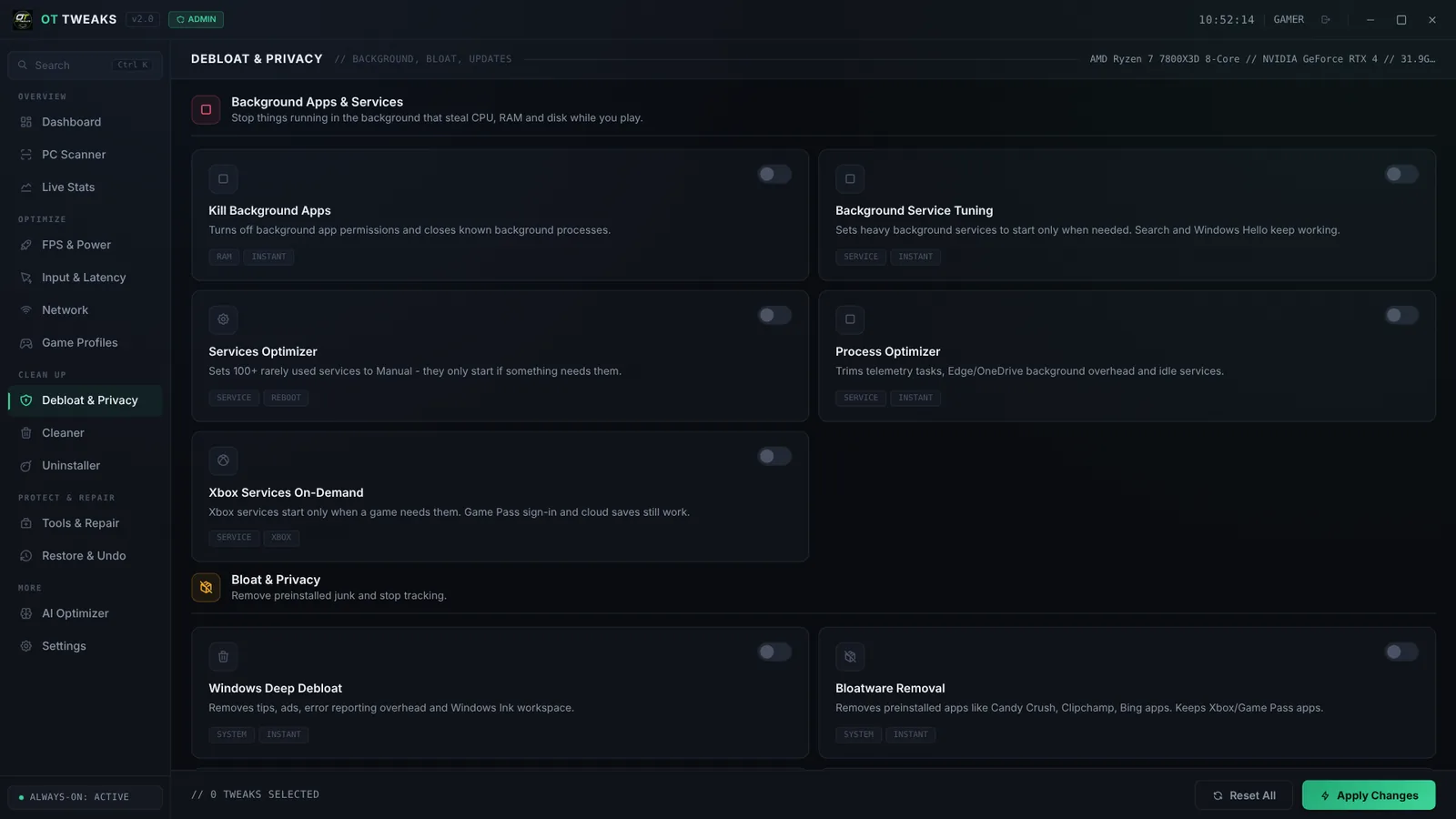
Real screens from OT Tweaks. Every tweak says what it does in plain English, and you can turn each one on or off yourself. Click any screenshot to see it full size.

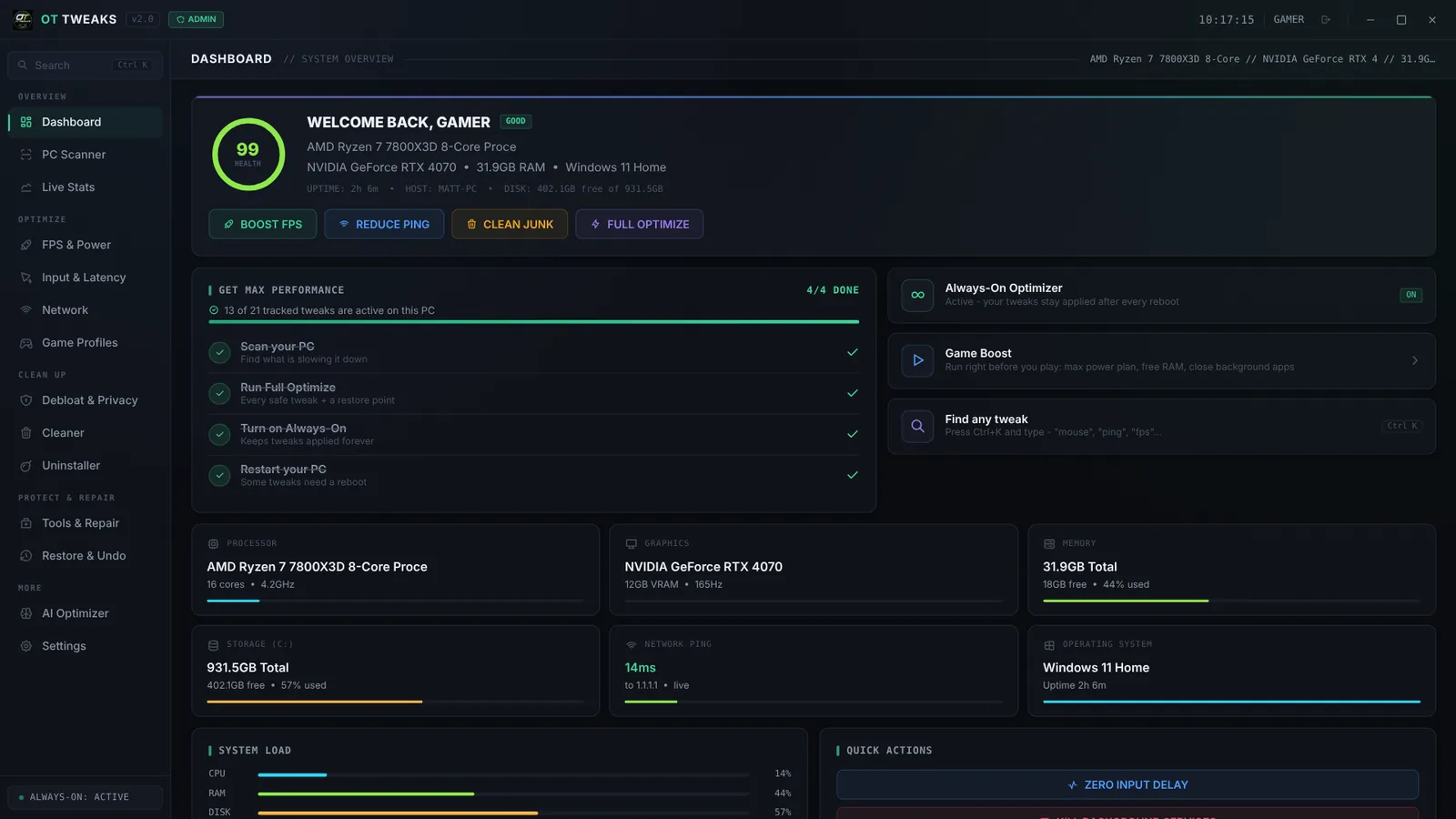
OT Tweaks dashboard showing a PC health score of 99, hardware details and quick action buttons
Dashboard

Your whole PC at a glance

Open the app and you see a health score for your PC, your CPU, graphics card, RAM, storage and live ping. Four buttons — Boost FPS, Reduce Ping, Clean Junk and Full Optimize — do the big jobs in one click.

  • "Get Max Performance" checklist walks you through setup
  • Game Boost frees RAM and closes background apps before you play
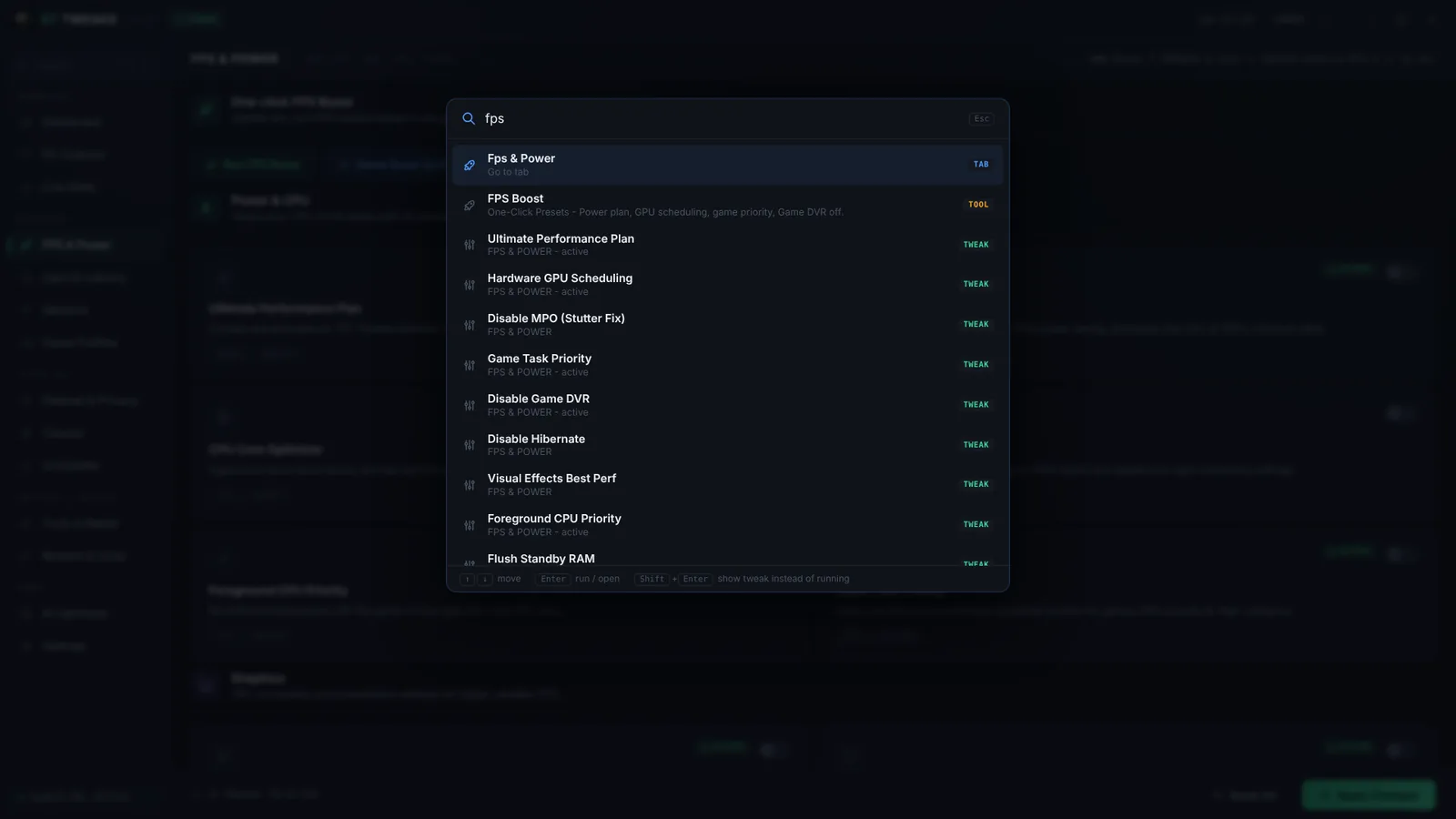
  • Press Ctrl+K to find any tweak by name
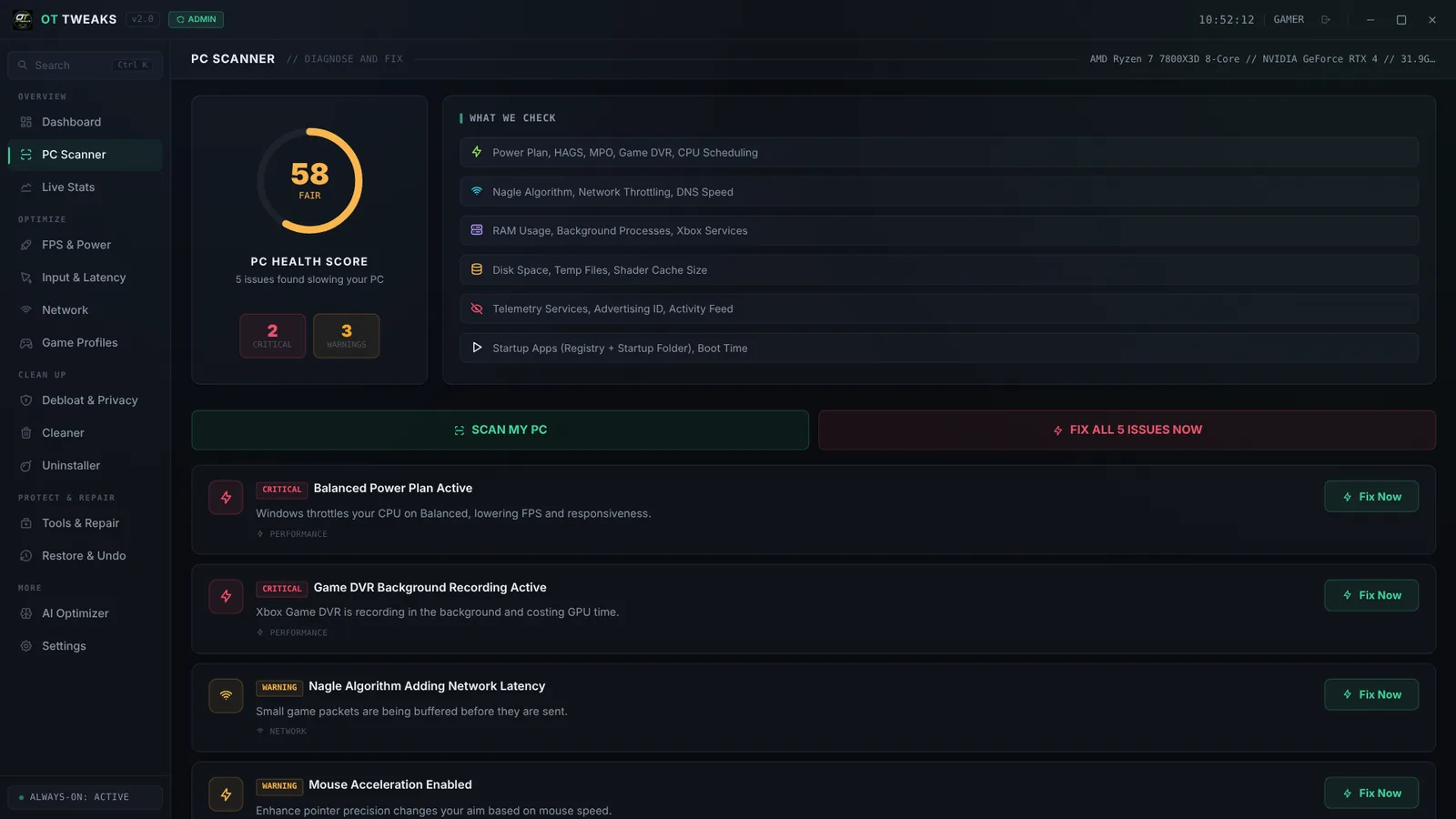
PC Scanner showing a health score of 58 with critical issues and Fix Now buttons
PC Scanner

Find out what's slowing you down

The scanner checks your power plan, GPU settings, Game DVR, network, RAM, startup apps and telemetry. Every problem it finds is explained, marked critical or warning, and has its own Fix Now button.

  • Health score out of 100, before and after
  • Fix issues one at a time, or all at once
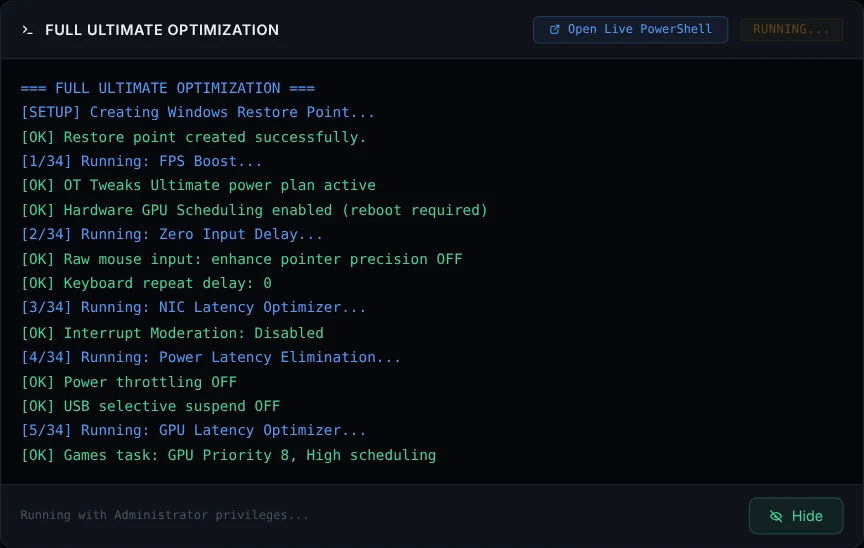
Full Optimize log showing a restore point being created and each tweak being applied
Full Optimize

One click runs everything, in order

Full Optimize creates a Windows restore point first, then applies every safe tweak for your hardware — power, GPU, input, network and background apps. A live log shows each change as it happens.

  • Restore point before anything changes
  • Adapts to NVIDIA, AMD or Intel automatically
  • Restart once and you're done
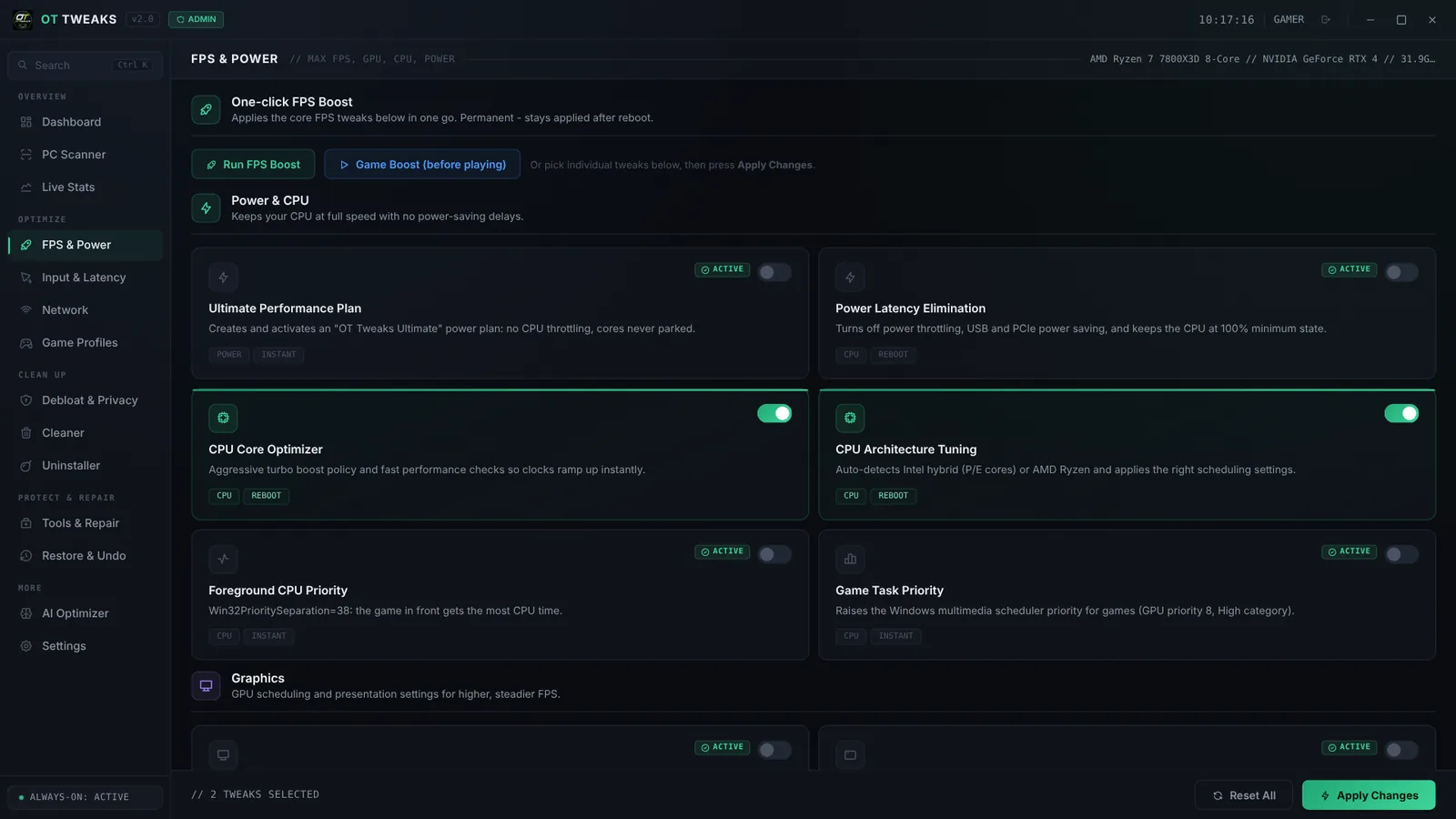
FPS and Power tab with the Ultimate Performance Plan, CPU Core Optimizer and game priority tweaks
FPS & Power

Let your CPU and GPU run at full speed

Windows parks CPU cores and drops clock speeds to save power. OT Tweaks switches on its own Ultimate power plan, stops throttling, tunes scheduling for Intel hybrid and AMD Ryzen chips, and gives the game in front the most CPU time.

  • One-click FPS Boost or pick tweaks one by one
  • Each tweak shows whether it needs a restart
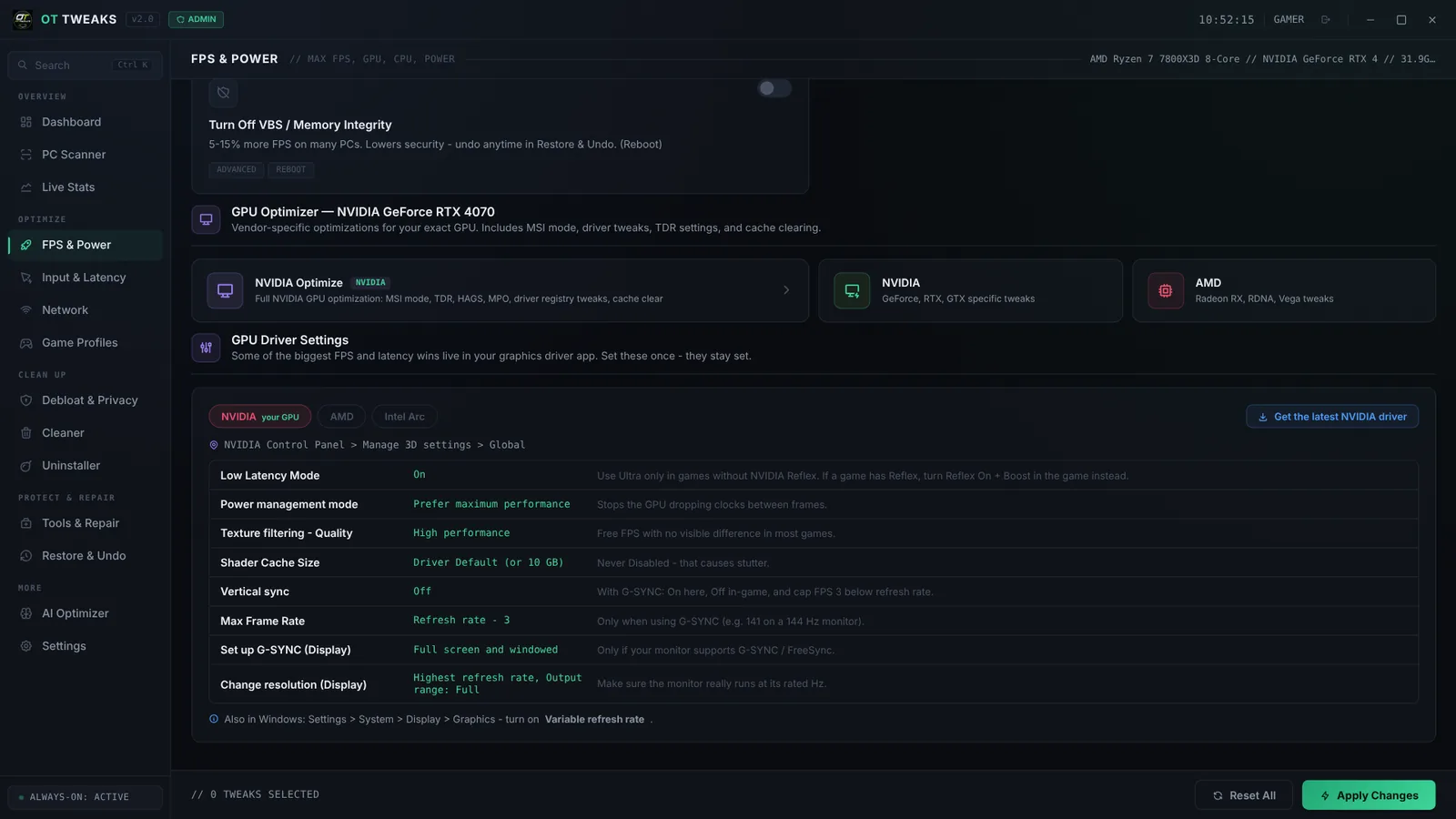
GPU optimizer for an NVIDIA GeForce RTX 4070 with recommended driver settings
GPU Optimizer

Tuned for your exact graphics card

OT Tweaks detects your GPU and applies the right tweaks for NVIDIA, AMD or Intel. It also shows the best settings for your driver app — low latency mode, power management, V-Sync and G-Sync — with a short reason for each.

  • MSI mode, GPU scheduling and shader cache handled for you
  • Driver settings guide for NVIDIA, AMD and Intel Arc
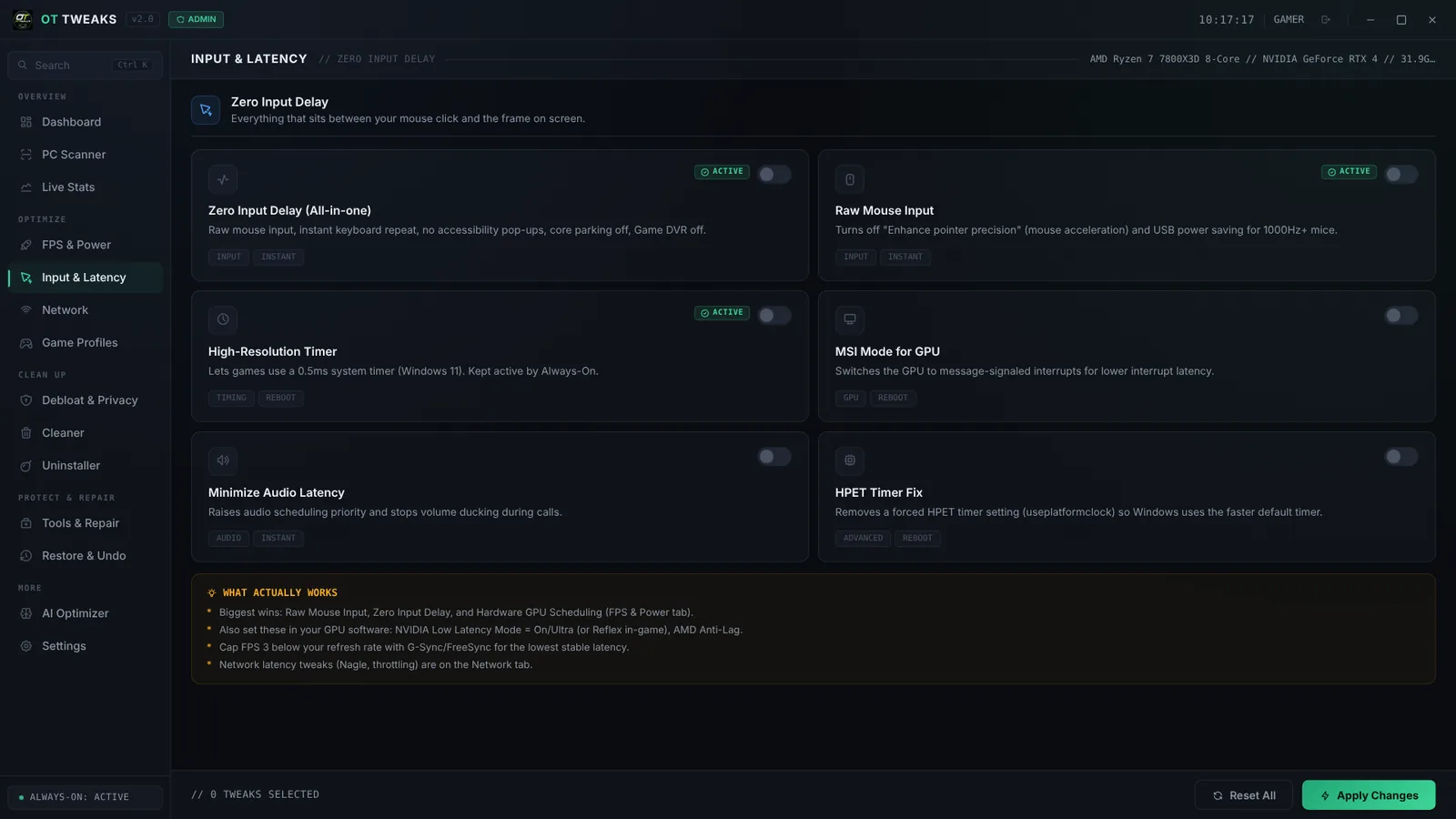
Input and Latency tab with Zero Input Delay, Raw Mouse Input and High-Resolution Timer
Input & Latency

Less delay between your click and the screen

Turns off mouse acceleration for raw input, holds a 0.5 ms system timer, switches your GPU to faster interrupts and removes keyboard repeat delay. A short "What actually works" box tells you which changes matter most.

  • Zero Input Delay applies all of it at once
  • Built for 1000 Hz+ gaming mice
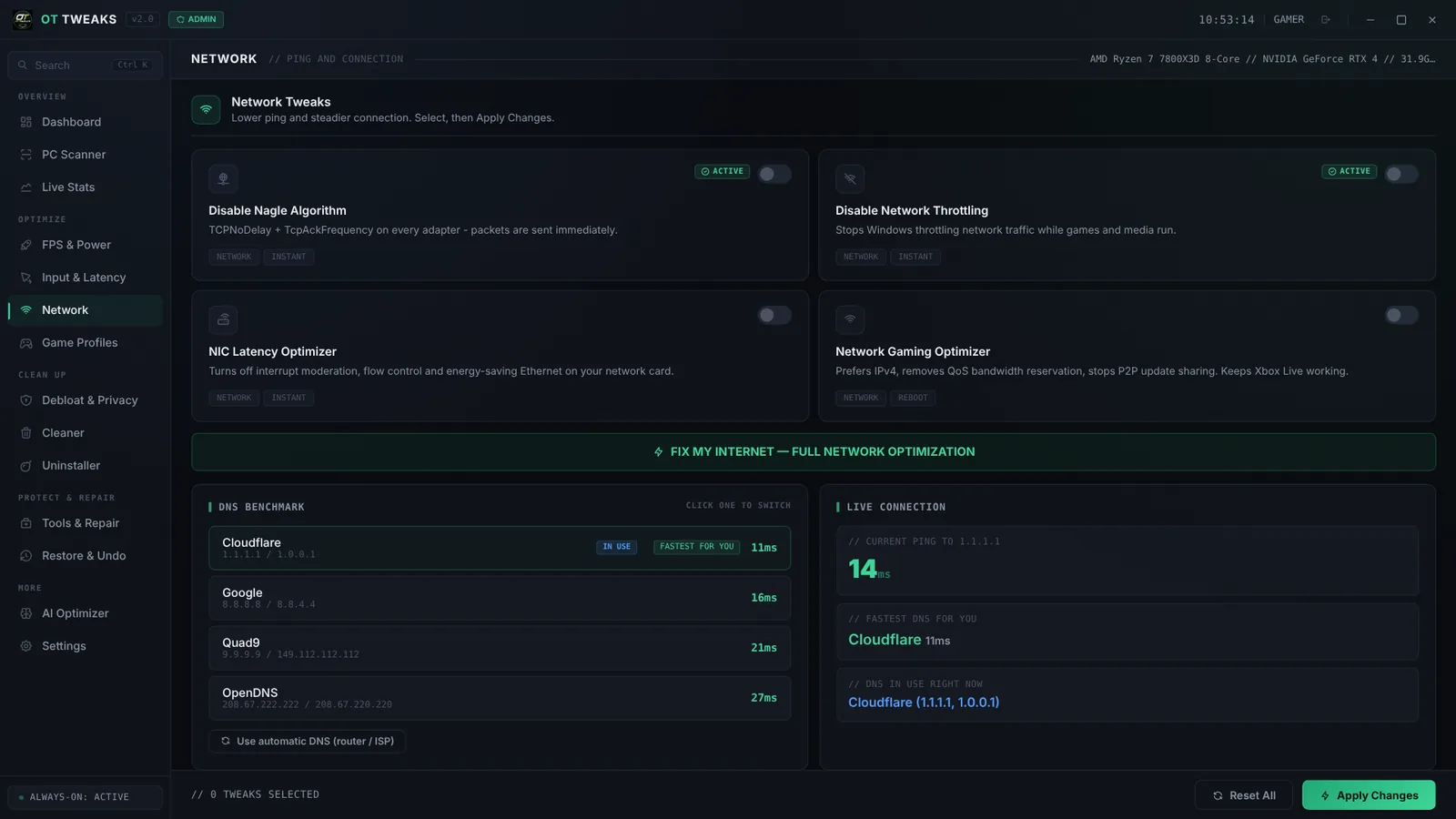
Network tab with a DNS benchmark showing Cloudflare as fastest and a live ping of 14 ms
Network

Lower ping, fewer spikes

A DNS benchmark tests Cloudflare, Google, Quad9 and OpenDNS from your PC and switches to the fastest in one click. Network tweaks turn off packet buffering and throttling, and a lag-under-load test shows if your router causes spikes.

  • Live ping right in the app
  • "Fix my internet" runs every network tweak at once
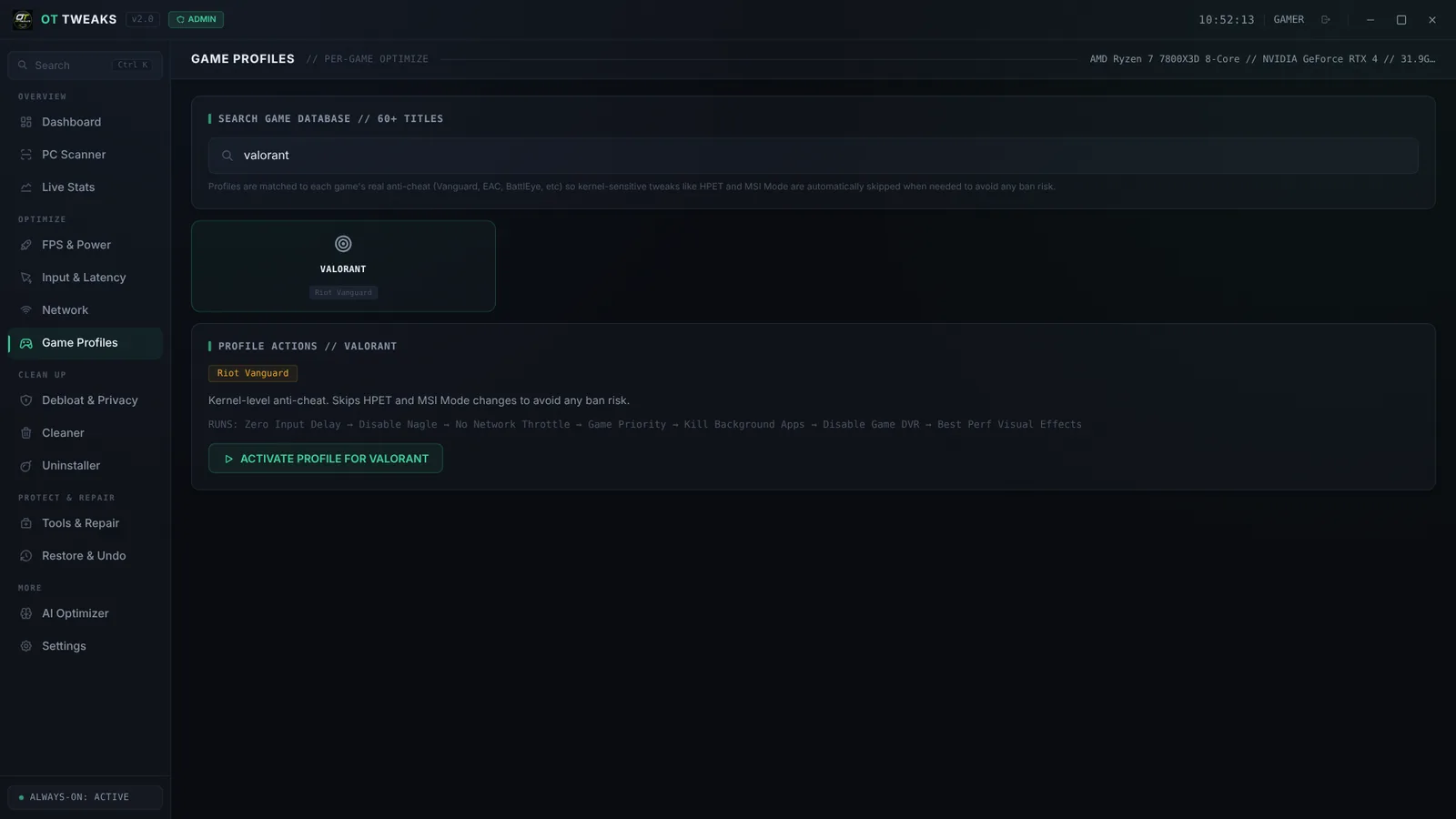
Game Profiles tab showing the Valorant profile matched to Riot Vanguard anti-cheat
Game Profiles

Profiles for 60+ games, anti-cheat aware

Search your game and activate its profile. Each one is matched to that game's anti-cheat — Vanguard, Easy Anti-Cheat, BattlEye — and automatically skips tweaks that anti-cheat is sensitive to.

  • Fortnite, Valorant, CS2, Apex, Warzone and more
  • Never touches game files or game memory
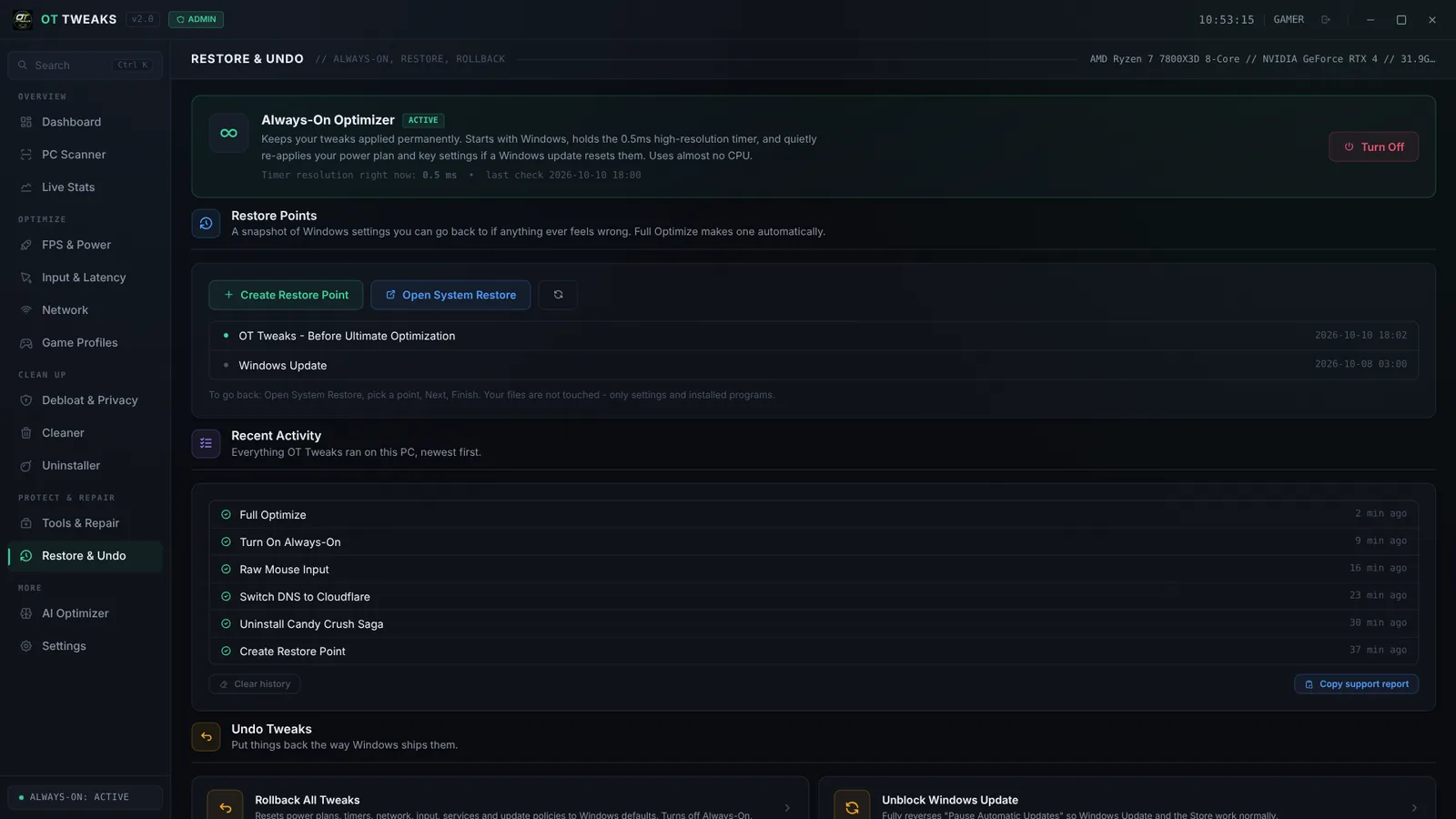
Restore and Undo tab with Always-On active, restore points and recent activity
Always-On & Undo

Set it once. It stays that way.

Windows updates quietly undo tweaks. Always-On starts with Windows, holds the 0.5 ms timer and re-applies your settings if an update resets them — using almost no CPU. Changed your mind? Undo a single tweak or roll everything back.

  • Restore points and a full activity log
  • Rollback All returns Windows defaults

And there's more

Up and running in minutes.

  1. 1

    Buy

    Check out securely with Stripe — card, Apple Pay or Google Pay. You land on a page with your download.

  2. 2

    Get your login

    Open a ticket in our Discord with your order email. We send your login, usually within a few hours.

  3. 3

    Optimize

    Sign in, click Full Optimize, turn on Always-On and restart. That's it — it stays applied.

Backed by real people. And an AI that answers instantly.

Every customer gets support in our Discord. Open a ticket and our AI assistant answers right away while the team takes a look.

🤖 Instant answers

Setup, fixes and "how do I…" — answered in seconds, any time of day.

🔄 Auto-updates

New versions install themselves. You'll see what changed after every update.

💻 New PC? Covered.

Request a PC change right from the app. Once approved, it unlocks automatically.

↩️ Undo anything

Undo a single tweak, or roll everything back to Windows defaults.

#support-0142-alexExample ticket
A
alex

My monitor is 165 Hz but games feel like 60. Did I break something?

OT Tweaks AI APP

AI answer — a team member will follow up if you still need help
S
OT Support Staff

Hey Alex, I've got this ticket too — shout if anything else comes up 👋

Safe to try. Easy to undo.

OT Tweaks only changes Windows settings. It never touches your game files and never disables your antivirus or firewall.

  • Restore point firstFull Optimize makes a Windows restore point before it changes anything.
  • Undo one, or undo allEvery active tweak has an Undo button. Rollback puts everything back to Windows defaults.
  • Normal Windows keeps workingWi-Fi, Bluetooth, audio, Search, Windows Hello, Game Pass and Xbox sign-in are left alone.
  • Anti-cheat awareNever touches games or anti-cheat processes. Game profiles skip tweaks kernel anti-cheats are sensitive to.
Lifetime license

OT Tweaks

$50one-time

No subscription. One license for one PC, with free updates.

Buy OT Tweaks

Secure checkout by Stripe · Card, Apple Pay, Google Pay

Doesn't work on your PC and we can't fix it? Refund policy

Everything included

  • Full Optimize and 50+ individual tweaks
  • Always-On — tweaks stay applied after reboots and updates
  • PC Scanner, DPC latency and hardware health checks
  • Lag-under-load test, DNS benchmark and network tools
  • 60+ game profiles and an NVIDIA / AMD / Intel GPU guide
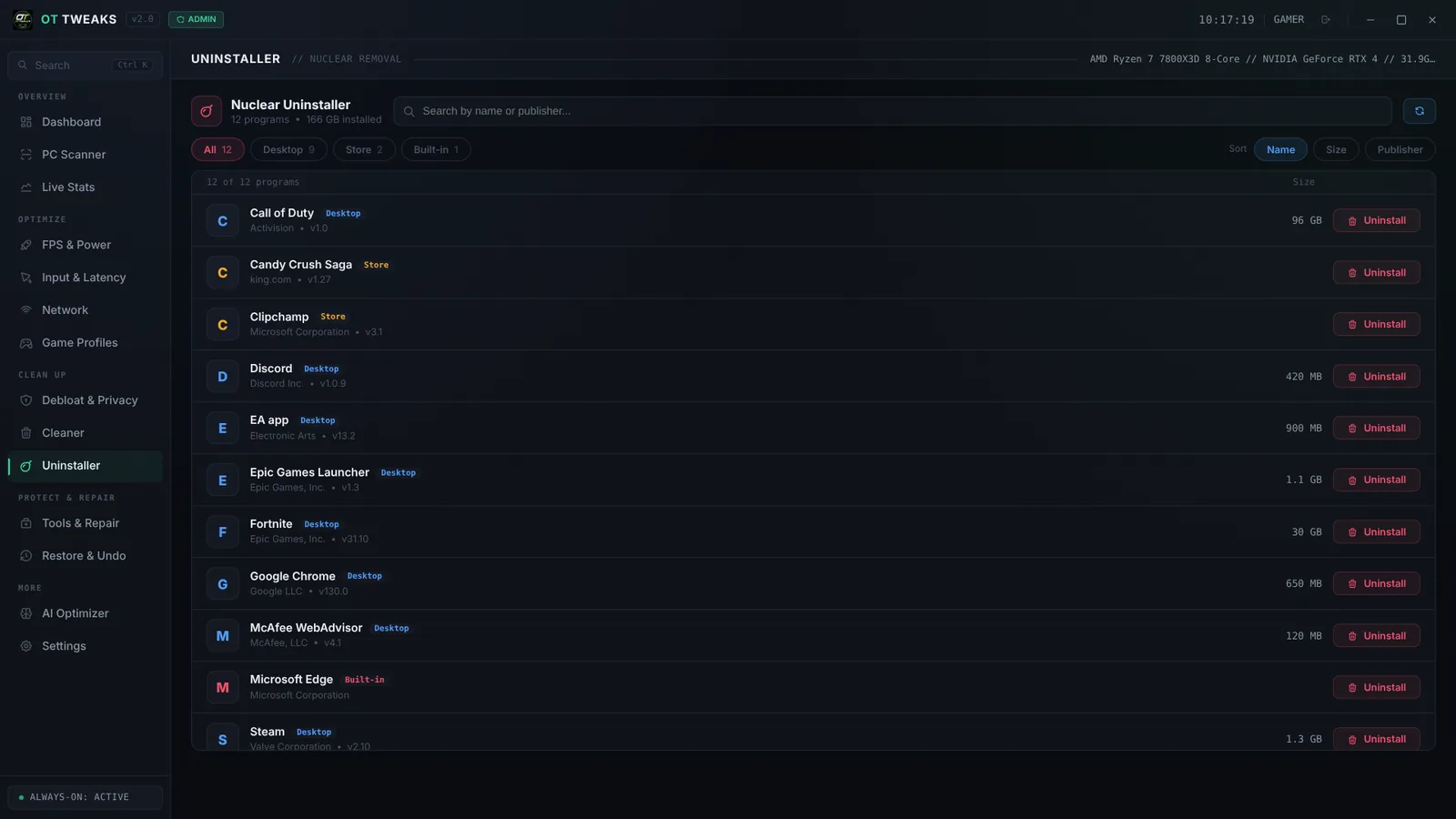
  • Nuclear Uninstaller, Cleaner, Debloat & Privacy
  • Undo any tweak, restore points and one-click rollback
  • Automatic updates, forever
  • Discord support with an instant AI assistant

Questions

Something else? Ask in our Discord.

How much will my FPS go up?

It depends on your PC. The biggest gains come on PCs still running stock Windows settings — power-saving plans, background recording, lots of background apps. You'll usually notice steadier frame times and fewer stutters before a higher average FPS. We don't promise a number, because no honest optimizer can.

Is it safe for my PC?

Yes. OT Tweaks only changes Windows settings, makes a restore point before Full Optimize, and lets you undo any single tweak or roll everything back to Windows defaults. It never disables your antivirus, firewall or security updates.

Can I get banned in games?

OT Tweaks changes Windows settings only. It never reads or modifies game files or game memory, and never touches game or anti-cheat processes. Game profiles also skip tweaks that kernel-level anti-cheats are sensitive to. OT Tweaks is not affiliated with any game publisher.

Will it work on my PC?

OT Tweaks runs on 64-bit Windows 10 and 11, on desktops and laptops, with NVIDIA, AMD or Intel graphics. It detects your hardware and applies the right settings for it.

How do I get the app after I pay?

Right after checkout you'll see a page with the download. Then open a ticket in our Discord with your order email and we'll send your login, usually within a few hours.

Can I use it on more than one PC?

Each license works on one PC — it locks to the first PC you sign in on. Got a new PC? Click "Request a PC change" in the app; once our team approves it, the app unlocks on the new PC automatically.

Do I have to run it every time I play?

No. The tweaks are permanent, and Always-On keeps them applied after reboots and Windows updates. Game Boost is optional if you want to free extra RAM before a session.

How do updates work?

Automatically. The app downloads new versions in the background and shows a "Restart to update" button. Updates are free for the life of your license.

What's your refund policy?

See our refund policy. If OT Tweaks doesn't work on your PC and we can't fix it, you get your money back.

Your PC is faster than it feels.

One click, one restart, and it stays that way.